/

/

/

Role

Role

Product Designer 2

Services

Services

UX Research
Design Strategy
Visual Design
Prototype
COALESCE
COALESCE
COALESCE
COALESCE
COALESCE
COALESCE
COALESCE
COALESCE
COALESCE
2023

Industry

Fintech

Platform

SAAS Platform

Team

Kapil Reehal, Om Ashish, Rahul Singh

Project Index

Overview

Problem Statement

My Responsibilities

Work Process

Outcomes

Key Learning

Overview

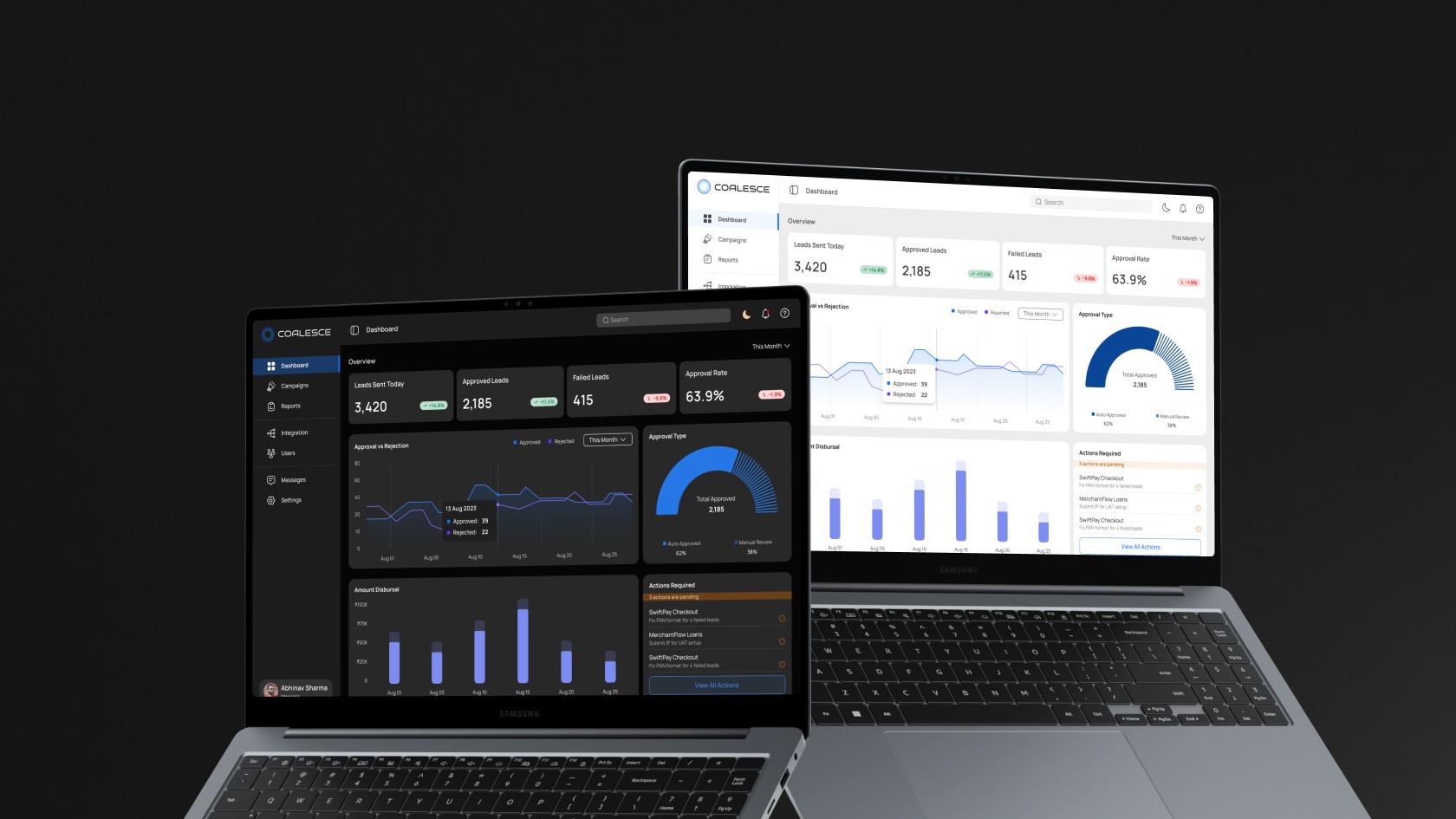
COALESCE started as a idea. The idea to deliver a unified web platform that enables business partners and internal teams to communicate seamlessly without relying on scattered email chains. This centralized hub ensures easy onboarding management, document sharing, and automated tracking of processes, ensuring easy lead generation monitoring.

An additional goal was to also design a platform that empowers internal teams by giving them full visibility, enabling them to manage operations more effectively and provide the right level of support when needed.

Ultimately, the vision behind COALESCE was to create a collaboration tool that makes lead management simple, transparent, and reliable. By giving partners the ability to track, assess, and manage their own progress, the platform reduces unnecessary delays and helps growth teams focus on scaling partnerships rather than resolving repeated operational issues.

Overview

COALESCE started as a idea. The idea to deliver a unified web platform that enables business partners and internal teams to communicate seamlessly without relying on scattered email chains. This centralized hub ensures easy onboarding management, document sharing, and automated tracking of processes, ensuring easy lead generation monitoring.

An additional goal was to also design a platform that empowers internal teams by giving them full visibility, enabling them to manage operations more effectively and provide the right level of support when needed.

Ultimately, the vision behind COALESCE was to create a collaboration tool that makes lead management simple, transparent, and reliable. By giving partners the ability to track, assess, and manage their own progress, the platform reduces unnecessary delays and helps growth teams focus on scaling partnerships rather than resolving repeated operational issues.

Problem Statement

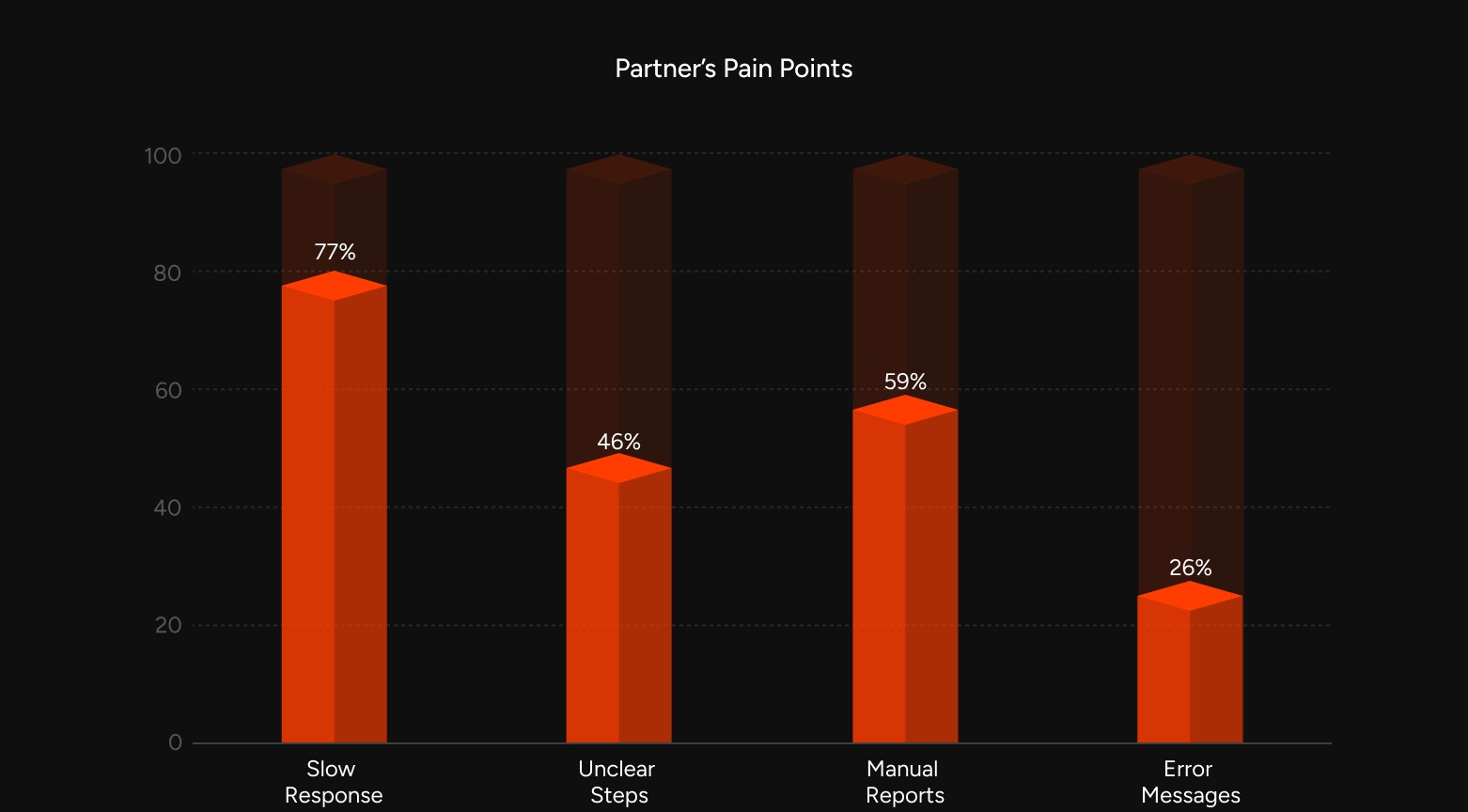
Before COALESCE, the partner experience was spread across multiple tools and communication channels. Important updates were buried in emails, integration progress was tracked manually, and small actions often took much longer than they should have. This lack of structure made it difficult for both partners and internal teams to move forward quickly.

Challenges
  • Partners often felt unsure of the next steps during onboarding, which slowed their progress.

  • Integration status was not visible in real time, causing repeated follow ups.

  • Support teams were burdened with handling small issues that could have been automated.

  • Tracking and validating leads was inconsistent, time consuming, and not scalable.

Problem Statement

Before COALESCE, the partner experience was spread across multiple tools and communication channels. Important updates were buried in emails, integration progress was tracked manually, and small actions often took much longer than they should have. This lack of structure made it difficult for both partners and internal teams to move forward quickly.

Challenges
  • Partners often felt unsure of the next steps during onboarding, which slowed their progress.

  • Integration status was not visible in real time, causing repeated follow ups.

  • Support teams were burdened with handling small issues that could have been automated.

  • Tracking and validating leads was inconsistent, time consuming, and not scalable.

My Responsibilities

I was responsible for driving the complete design process of COALESCE, starting from planning the user experience to building a detailed design system that could support future growth. I also ensured that the platform delivered a smooth experience for different user roles while keeping the interface simple and easy to adopt.

What I handled
  • Defining the UX strategy and mapping user journeys across different roles.

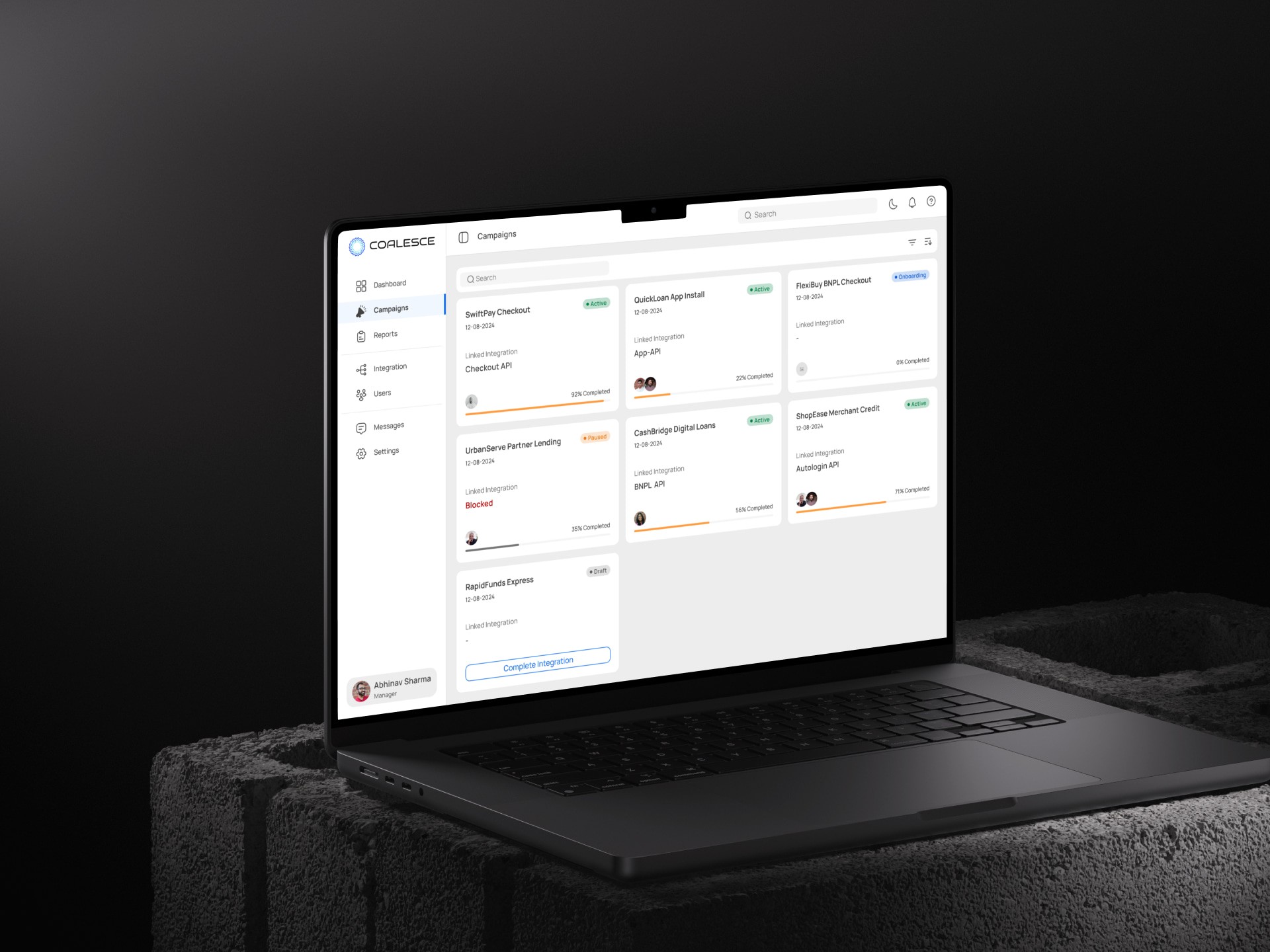
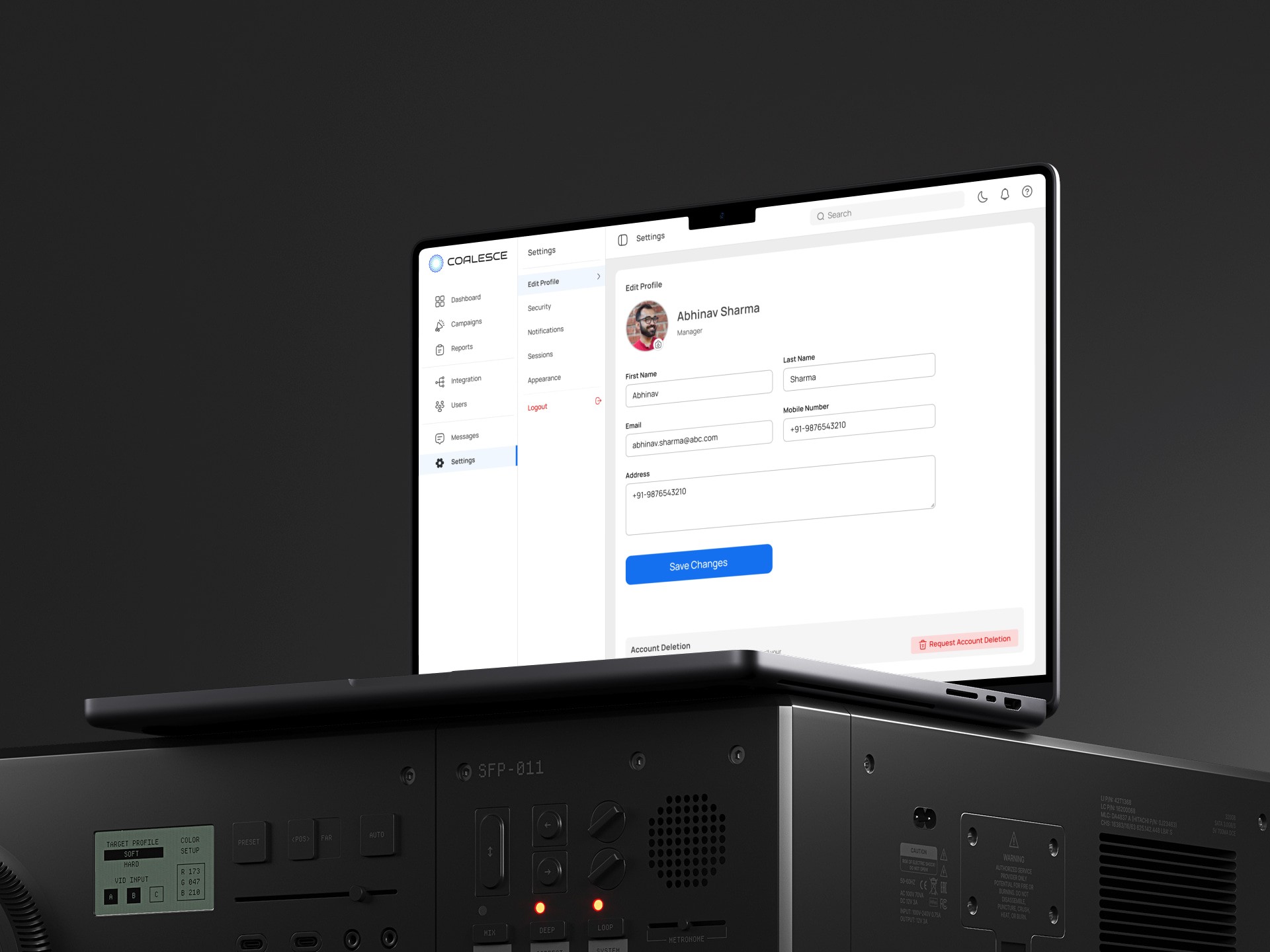
  • Designing UI screens with clear layouts and consistent interactions.

  • Structuring the information architecture to support role based access.

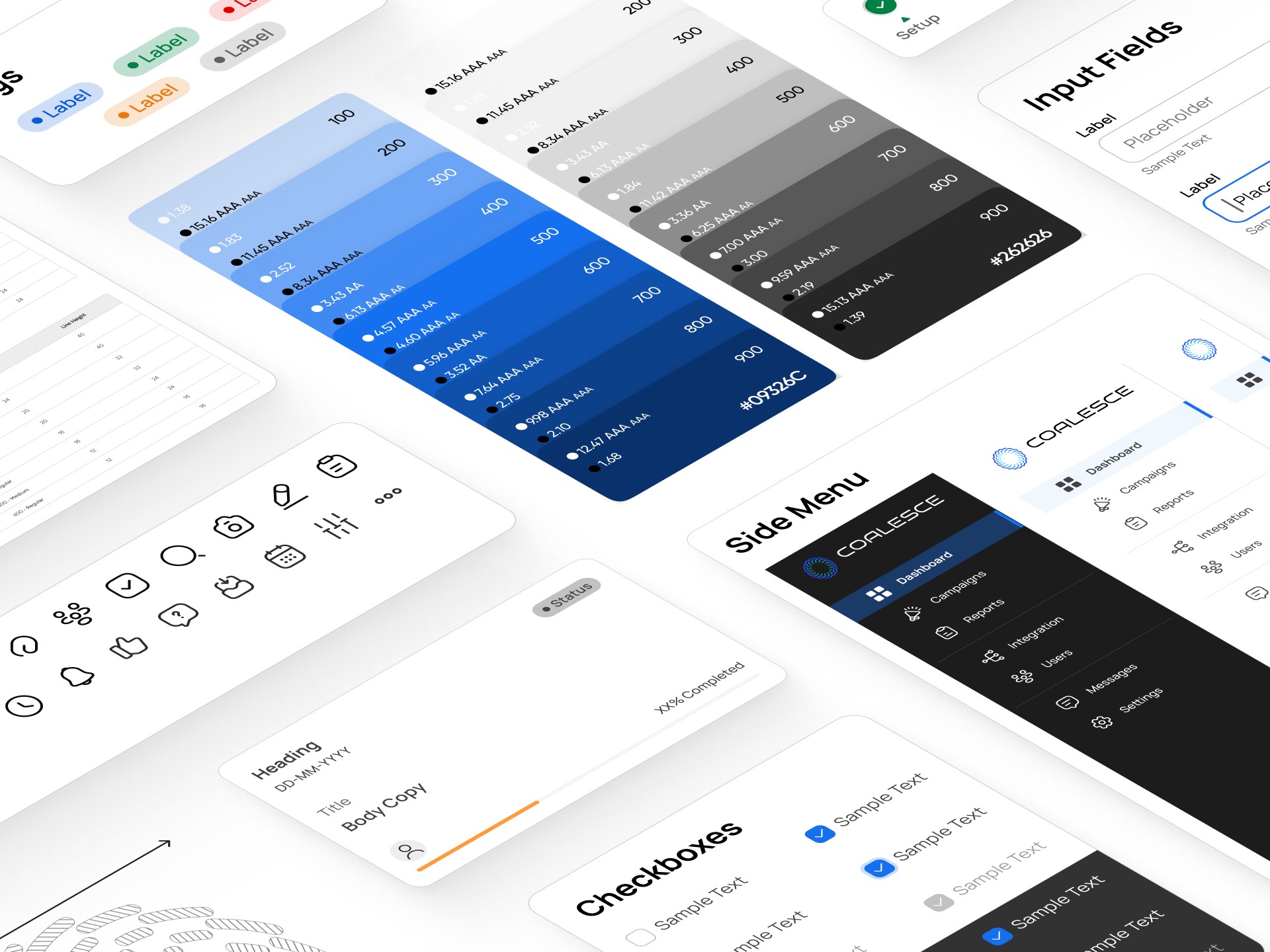
  • Developing a design system with reusable components for consistency.

  • Creating clickable prototypes for validation, feedback, and developer handoff.

My Responsibilities

I was responsible for driving the complete design process of COALESCE, starting from planning the user experience to building a detailed design system that could support future growth. I also ensured that the platform delivered a smooth experience for different user roles while keeping the interface simple and easy to adopt.

What I handled
  • Defining the UX strategy and mapping user journeys across different roles.

  • Designing UI screens with clear layouts and consistent interactions.

  • Structuring the information architecture to support role based access.

  • Developing a design system with reusable components for consistency.

  • Creating clickable prototypes for validation, feedback, and developer handoff.

Research & Insights

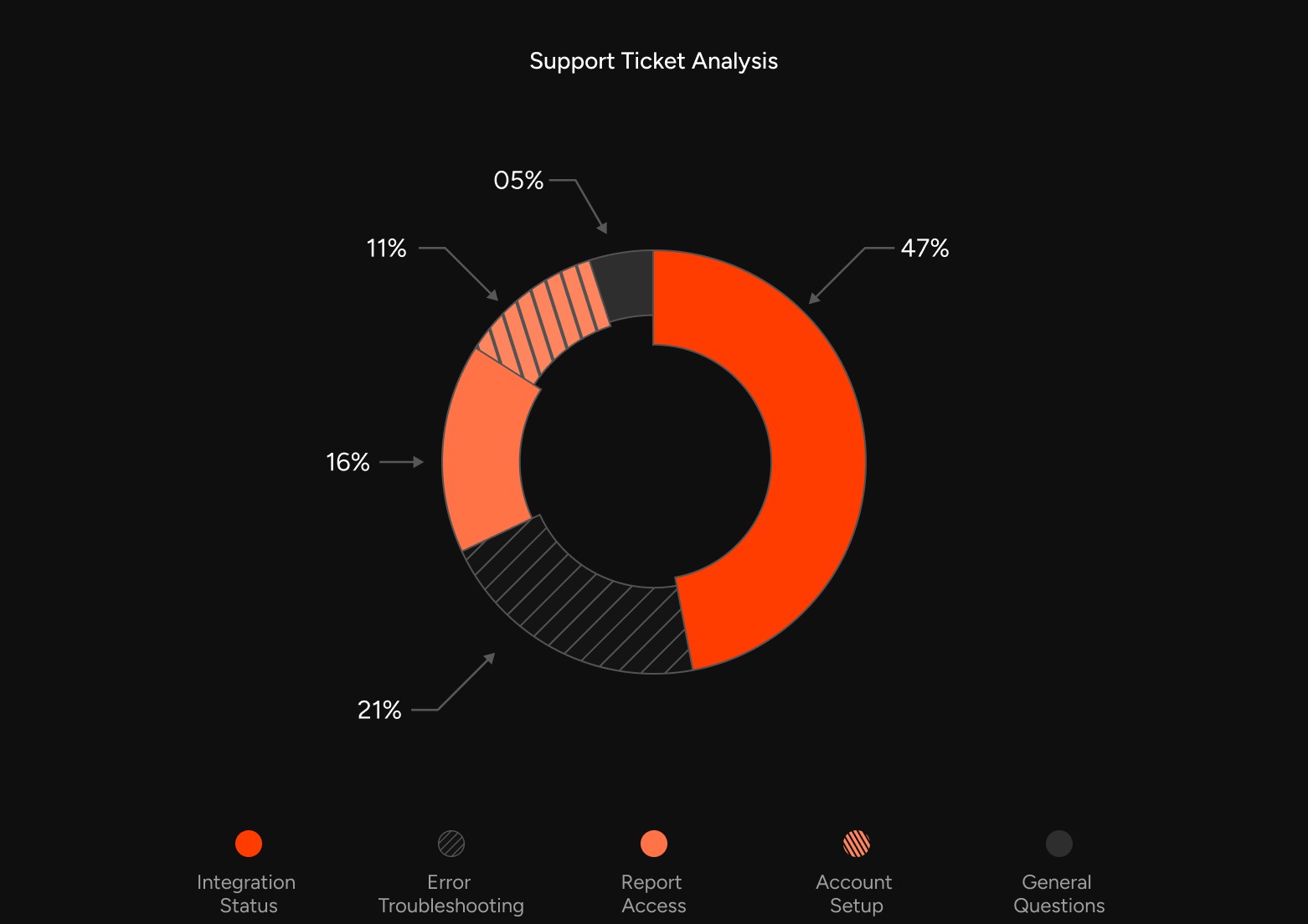
To fully understand the problems, I collaborated closely with various internal teams and studied real partner interactions. I also reviewed past support tickets to find recurring issues and observed how partners currently handled onboarding and lead tracking. This helped me identify common friction points and areas for improvement.

Key Insights
  • Partners wanted a clear and guided journey rather than scattered instructions.

  • Small actions like submitting IPs or requesting credentials caused delays that could be avoided.

  • Both partners and teams needed real time visibility into progress to reduce unnecessary communication.

  • Lead performance data was often hard to access, making decision making slower and less reliable.

Research & Insights

To fully understand the problems, I collaborated closely with various internal teams and studied real partner interactions. I also reviewed past support tickets to find recurring issues and observed how partners currently handled onboarding and lead tracking. This helped me identify common friction points and areas for improvement.

Key Insights
  • Partners wanted a clear and guided journey rather than scattered instructions.

  • Small actions like submitting IPs or requesting credentials caused delays that could be avoided.

  • Both partners and teams needed real time visibility into progress to reduce unnecessary communication.

  • Lead performance data was often hard to access, making decision making slower and less reliable.

Strategy & UX Thinking

The strategy for COALESCE was built around giving partners more independence while keeping the system structured and transparent. The platform needed to help users move through their tasks step-by-step without depending heavily on support teams. At the same time, it had to give internal teams confidence and visibility to manage all partnerships effectively.

Key Ideas
  • Guided onboarding flows that were broken into simple, easy to follow steps.

  • Dashboards tailored to different roles so each user only saw what was relevant.

  • Progress indicators and status updates to keep everyone aligned on where things stood.

  • Contextual help, tooltips, and inline guidance so users could resolve common issues themselves.

Strategy & UX Thinking

The strategy for COALESCE was built around giving partners more independence while keeping the system structured and transparent. The platform needed to help users move through their tasks step-by-step without depending heavily on support teams. At the same time, it had to give internal teams confidence and visibility to manage all partnerships effectively.

Key Ideas
  • Guided onboarding flows that were broken into simple, easy to follow steps.

  • Dashboards tailored to different roles so each user only saw what was relevant.

  • Progress indicators and status updates to keep everyone aligned on where things stood.

  • Contextual help, tooltips, and inline guidance so users could resolve common issues themselves.

Design Process

The design process followed an iterative and collaborative approach to ensure that the solution was both user friendly and feasible. I started by defining user flows for each type of role and scenario, then moved on to wireframes that helped test structure and logic early on. Once the flows were validated, I designed the interface with a clean and minimal approach, making sure the platform felt approachable and easy to navigate.

Steps I followed
  • Mapped out detailed user journeys for Admins, Developers, and Agents.

  • Created low fidelity wireframes for review and early alignment with stakeholders.

  • Designed high fidelity UI with a focus on clarity and usability across workflows.

  • Built a reusable design system to speed up future updates and maintain consistency.

  • Ensured responsive layouts that adapted well to different screen sizes and use cases.

Design Process

The design process followed an iterative and collaborative approach to ensure that the solution was both user friendly and feasible. I started by defining user flows for each type of role and scenario, then moved on to wireframes that helped test structure and logic early on. Once the flows were validated, I designed the interface with a clean and minimal approach, making sure the platform felt approachable and easy to navigate.

Steps I followed
  • Mapped out detailed user journeys for Admins, Developers, and Agents.

  • Created low fidelity wireframes for review and early alignment with stakeholders.

  • Designed high fidelity UI with a focus on clarity and usability across workflows.

  • Built a reusable design system to speed up future updates and maintain consistency.

  • Ensured responsive layouts that adapted well to different screen sizes and use cases.

Prototype & Testing

To validate the solution, I built an interactive prototype that covered all key journeys of the platform. This prototype was shared with internal users to simulate real scenarios, giving us valuable insights into how the experience worked in practice. Testing feedback played an important role in refining the design before development began.


Testing Results
  • Progress indicators gave users confidence and helped them understand where they stood.

  • Contextual actions made it easier for partners to know what to do next without extra support.

  • Real time success and error messages reduced uncertainty and improved overall trust.

  • Small improvements were made to increase visibility of certain buttons and tooltips after the feedback.

Prototype & Testing

To validate the solution, I built an interactive prototype that covered all key journeys of the platform. This prototype was shared with internal users to simulate real scenarios, giving us valuable insights into how the experience worked in practice. Testing feedback played an important role in refining the design before development began.


Testing Results
  • Progress indicators gave users confidence and helped them understand where they stood.

  • Contextual actions made it easier for partners to know what to do next without extra support.

  • Real time success and error messages reduced uncertainty and improved overall trust.

  • Small improvements were made to increase visibility of certain buttons and tooltips after the feedback.

Outcomes

COALESCE had a clear positive impact on both partners and internal teams after launch. Partners could now move through onboarding faster and manage their progress independently, while internal teams gained a transparent view of activities across all partners. This reduced the number of support queries and saved significant time for both sides.


Key Results
  • Faster and smoother onboarding process for new partners

  • Considerable reduction in support queries related to integration steps

  • Better visibility for internal teams to track and manage multiple partnerships at once

  • Strong positive feedback from partners who appreciated the simplicity of the platform

Outcomes

COALESCE had a clear positive impact on both partners and internal teams after launch. Partners could now move through onboarding faster and manage their progress independently, while internal teams gained a transparent view of activities across all partners. This reduced the number of support queries and saved significant time for both sides.


Key Results
  • Faster and smoother onboarding process for new partners

  • Considerable reduction in support queries related to integration steps

  • Better visibility for internal teams to track and manage multiple partnerships at once

  • Strong positive feedback from partners who appreciated the simplicity of the platform

Key Learnings

Working on COALESCE highlighted the importance of designing for clarity and simplicity in complex workflows. By breaking the process into smaller, guided steps, partners felt more confident and less dependent on support. Creating role based experiences also made the platform easier to use, as each user saw only what they needed.


What I Learned
  • Simplicity is the most effective way to reduce friction in multi-role platforms.

  • Embedding support inside the workflow is more powerful than separate documentation.

  • A well built design system saves time and ensures long term scalability.

  • Early testing and collaboration with developers improves implementation and reduces rework.

Key Learnings

Working on COALESCE highlighted the importance of designing for clarity and simplicity in complex workflows. By breaking the process into smaller, guided steps, partners felt more confident and less dependent on support. Creating role based experiences also made the platform easier to use, as each user saw only what they needed.


What I Learned
  • Simplicity is the most effective way to reduce friction in multi-role platforms.

  • Embedding support inside the workflow is more powerful than separate documentation.

  • A well built design system saves time and ensures long term scalability.

  • Early testing and collaboration with developers improves implementation and reduces rework.